

Sending the same generic email to your entire subscriber list is one of the quickest ways to see open rates decline. Relevant, targeted messages driven by audience segmentation consistently outperform mass blasts.
In Grigora, Segments allow you to create dynamic, automated audiences that update automatically in real time based on rules you define. This guide explains how dynamic segments work, how they differ from static lists, and why they are essential for modern email marketing.
Static Lists vs. Dynamic Segments
Criteria | Static Lists & Tags | Dynamic Segments |
|---|---|---|
Definition | A fixed bucket of contacts. | A live search query evaluated continuously. |
Membership Update | Manual (contacts must be added or removed explicitly via import, form, or admin). | Automatic (contacts flow in and out automatically as their attributes and behaviors change). |
Best For | Core publications (e.g., Weekly Newsletter, Product News). | Targeted behavior, recency, VIP tiers (e.g., Joined in the last 14 days, High-value customers). |
How Dynamic Segments Work in Real Time
A segment in Grigora does not store an immutable list of emails. Instead, it stores a rule definition (for example: joined within the last 30 days AND status is subscribed).
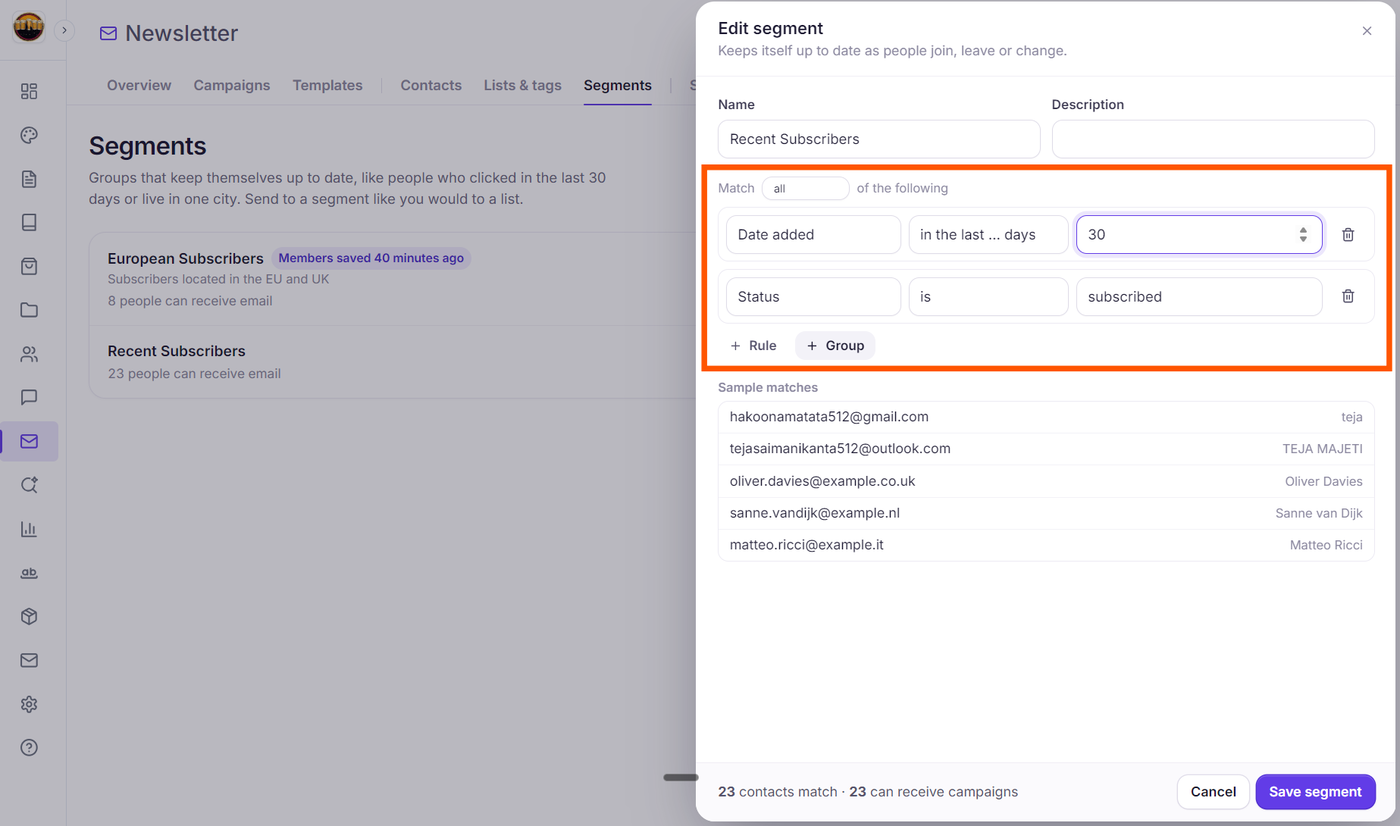
When a new visitor signs up today, they automatically match the rule and enter the segment with no manual action required.
Once 31 days pass, they automatically roll out of the segment.
When you launch a campaign targeted at that segment, Grigora executes the rule query at the moment of send, ensuring you reach the freshest audience possible.
Understanding 'Contacts Match' vs. 'Sendable Contacts'
When creating or inspecting segments in Grigora, you will notice two distinct audience metrics in the editor footer: contacts match and can receive campaigns:
Contacts Match:
Displays as {N} contacts match (or 1 contact matches). This is the total number of contacts in your database whose profile attributes meet the segment's rule criteria.
Sendable Contacts (Can Receive Campaigns):
Displays as · {N} can receive campaigns (and on the main Segments card as {N} people can receive email). This represents the number of matching contacts who are actually deliverable. Grigora automatically screens out anyone who cannot receive email campaigns:
Contacts awaiting double opt-in verification (Not confirmed yet).
Contacts who previously unsubscribed (Unsubscribed).
Addresses marked as hard-bounced (Bounced).
Addresses flagged for spam complaints (Marked as spam).
Addresses on your project's Suppression List (On the do-not-send list).
Deliverability Safety: When you send a campaign to a segment, Grigora only delivers to contacts who can receive campaigns. You will never accidentally send to an unsubscribed, unverified, or bounced contact.
Common Segment Examples
New Subscriber Welcome Cohort: Contacts who joined in the last 7 days.
High-Engagement VIPs: Subscribers with custom field
loyalty_points > 500.Corporate Leads: Contacts where custom field
company_name is set.Lapsed Readers: Contacts who have not opened a campaign in the last 90 days.
Next Steps
Understanding "Contacts Match" vs. "Sendable Contacts" in Grigora Segments
How to Build Targeted Audience Segments with Multi-Condition Rules (AND / OR Logic)
How to Segment Subscribers Based on Activity, Recency, and Custom Fields
How to Target the Right Audience: Including and Excluding Lists, Tags, and Segments